Clowd vs ZoomIt.
ZoomIt is the presenter's zoom-and-draw tool. Clowd draws on screen too, and adds a full image editor and a multi-track video editor.
- Price
- FreeFree. No trial, no tiers, no watermark.
- Status
- Very active4.10.0 released Oct 19, 2026. In development since 2015.
- Best for
- Editing after the snipRecordings you can editSharing a region in meetings
- Price
- FreeFree (Microsoft Sysinternals). No paid tier.
- Status
- Very activeMonthly releases in 2026, including a Mac version. Also ships inside PowerToys.
- Best for
- Live presentation zoomTechnical demosA tiny, trusted tool
Feature by feature.
Every ZoomIt verdict comes from its own documentation.
| Feature | Clowd | ZoomIt |
|---|---|---|
| Capture | ||
| Region capture | YesPress PrtScn and drag. Edges can be placed to the pixel while zoomed. | YesCtrl+6 snips a region to the clipboard or a file (PNG, WebP, or JPG on Windows; PNG on Mac). |
| Color picker | YesPress H on any pixel. The Color Editor copies HEX, RGB or HSL and has an eyedropper. | No |
| Scrolling capture | YesRewinds to the top first, and sticky headers appear once. Scrolls whole windows, not panes inside them. Needs Accessibility permission on macOS. | YesPanorama / scrolling screenshot (Ctrl+8) since v11.0, also on Mac (suppresses fixed headers and footers). |
| Text recognition (OCR) | YesOn-device. The text lifts off the capture so you can check it, then copy, search or share it. OCR and the AI effects need Windows or a Mac with Apple Silicon. Latin, Greek, Chinese and Japanese kana. Cyrillic and Korean aren’t supported yet. | YesCtrl+Alt+6 copies OCR text from a region to the clipboard (Windows and Mac, on-device). |
| Annotate | ||
| Image editor | YesEvery capture opens in the image editor. Objects stay editable and sessions autosave. | PartialYou draw on a frozen or zoomed screen before copying. There's no editor for existing images or saved captures. |
| Blur and pixelate | YesMosaic, blur or solid. It only affects the image underneath, never your annotations. | YesBlur pen (X) on Windows. The Mac README doesn't list a blur pen. |
| Step numbers | YesNumbered steps. Drag from a step to pull an arrow out of it. | No |
| Record | ||
| Screen recording | YesRegion, window or screen, with a live frame-rate meter. | YesFull screen, region (optionally locked to 16:9), or window (Windows) to MP4. |
| GIF | YesAny recording converts to a GIF in one click from Recents. | YesGIF output format on Windows. The Mac version records MP4 only. |
| Webcam | YesRecorded as a separate track you place in the editor. | YesOverlay in any corner, 5 sizes (up to full screen), 4 shapes, since v12.0. |
| Edit | ||
| Trim and cut | YesTrim, split, ripple delete and Ctrl+K to split every track. | YesTrim editor opens after recording and works on existing MP4s. It can also delete interior segments (PowerToys 0.101). |
| Multi-track timeline | YesVideo, audio, text, image, zoom, speed, cursor and keyboard rows on one timeline. | NoYou can append clips with hard-cut or fade transitions, but there's no timeline or tracks. |
| Zoom effects | Yes1× to 5× with eased ramps. Zoom rows stack. Zooms are placed by hand with a fixed focus. There is no auto-zoom or cursor-follow. | PartialYou can record while live-zoomed. There are no post-recording zoom keyframes. |
| Speed changes | Yes0.25× to 10× per segment, with pitch-corrected audio. | No |
| Backgrounds | Yes10 background styles, including animated ones. | No'image backgrounds' refers to the webcam background, not padded framing. |
| Present | ||
| Draw on screen | Yes9 tools, click-through on Esc, an eraser and one undo history across monitors. | YesDraw with or without zoom, LiveDraw, whiteboard/blackboard, pen and touch input. |
| Presentation zoom | PartialZoom on a frozen screen (the capture overlay or Draw on Instant Screenshot). There is no live presentation zoom. | YesThe signature static zoom plus LiveZoom. |
| Share a region | YesAny rectangle, in any meeting app that can share a window. Blur or black it out live. Viewer frame rate is limited by the meeting app. | PartialDemoMirror mirrors the screen, a region, or a window to a second monitor. It isn't a virtual camera or window aimed at meeting apps. |
| Live keystrokes | YesThe same keycap renderer as the video editor, in 9 screen positions. | NoNot in the documented settings. |
| Share | ||
| Upload and share | YesCaptures, recordings, text, files and folders. Image and video uploads need a storage destination; text pastes work out of the box. | No |
| Platform & price | ||
| Windows | YesWindows 10 and later, x64 and ARM64. | Yes |
| macOS | YesmacOS 13 and later, Apple Silicon and Intel. OCR and the AI effects need Windows or a Mac with Apple Silicon. Default hotkeys use PrtScn. Rebind them in Settings → Hotkeys on a Mac keyboard. | YesZoomIt for Mac (separate MIT project, macOS 14+, via Homebrew). Its README lists no GIF output, window recording, blur pen, or DemoType. |
| Linux | NoNot available yet. | No |
| Free | YesFree. No trial, no tiers, no watermark. | Yes |
| Open source | YesMIT licensed. The part that runs text recognition and the AI effects is GPL-3.0. | YesWindows source lives in the PowerToys repo (MIT), and ZoomIt for Mac is MIT. |
Sources8Checked Oct 19, 2026
- learn.microsoft.com/en-us/sysinternals/downloads/zoomit
- learn.microsoft.com/en-us/sysinternals
- learn.microsoft.com/en-us/windows/powertoys/zoomit
- github.com/microsoft/Zoomit-Mac
- github.com/microsoft/ZoomitForMac/releases/tag/12.3.0
- github.com/microsoft/PowerToys/releases/tag/v0.101.2362.0
- github.com/microsoft/PowerToys/releases/tag/v0.102.2883.0
- deskmodder.de/blog
Product names are trademarks of their owners and are used only to identify them. Spotted something out of date? Open an issue.
Where ZoomIt wins.
If these matter most to you, ZoomIt may be the better pick.
Live presentation zoom.
DemoType for scripted typing in demos.
DemoMirror to a second monitor.
A break timer, in a tiny footprint.
Clowd has no live presentation zoom.
Where Clowd goes further.
Draw on Screen
A drawing toolbar, not just hotkeys.
ZoomIt draws with hotkeys. Clowd's Draw on Screen has a toolbar with 9 tools, step badges and live keystrokes, and Esc leaves the ink up while you use your apps.
More about Draw on Screen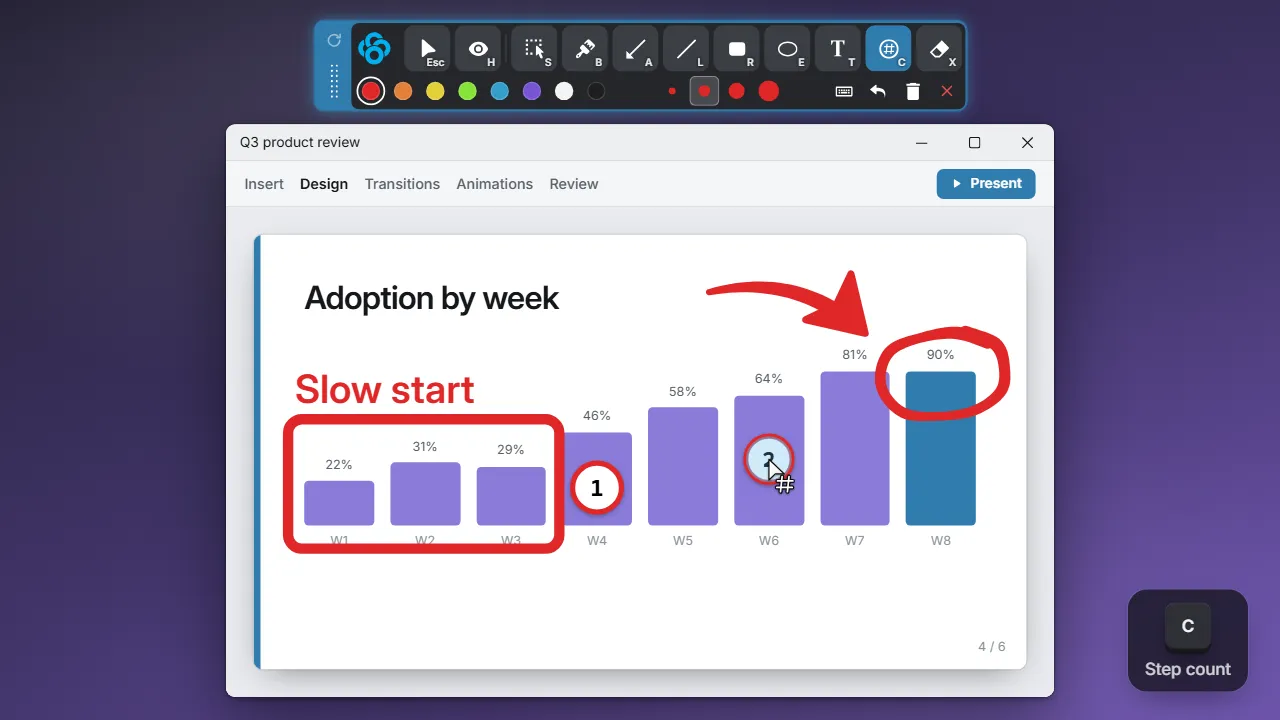
Image Editor
An editor after the snip.
ZoomIt has you draw before you copy. Clowd opens every capture in an editor where you can change or restyle annotations later.
More about the image editor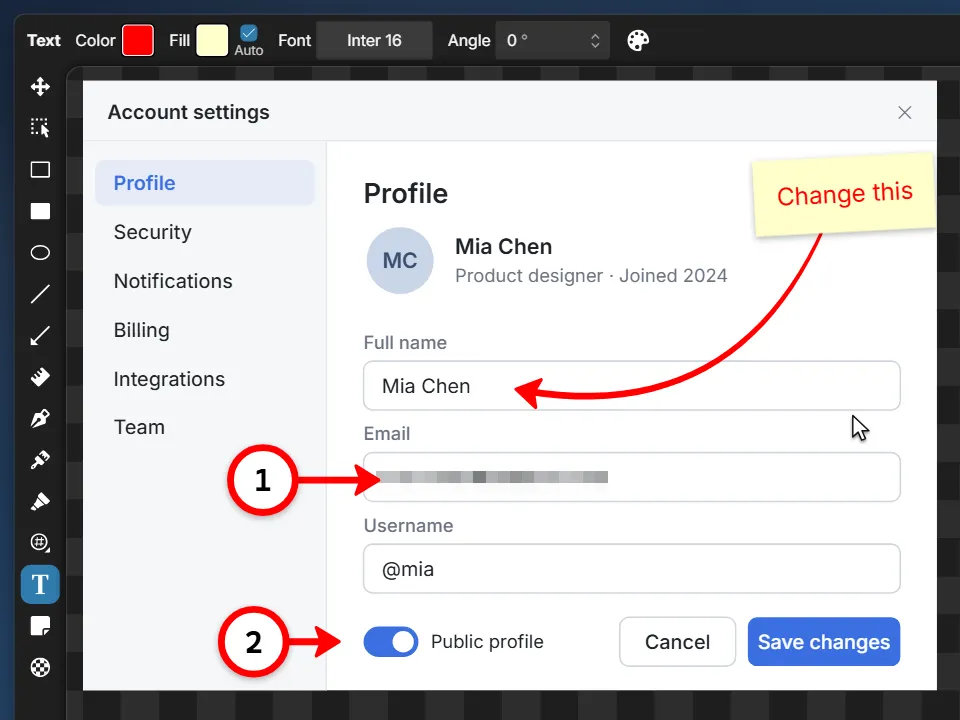
Video Editor
More than trim.
ZoomIt's editor trims and joins clips. Clowd's has a multi-track timeline, zoom and speed effects, backgrounds and voice-over.
More about the video editor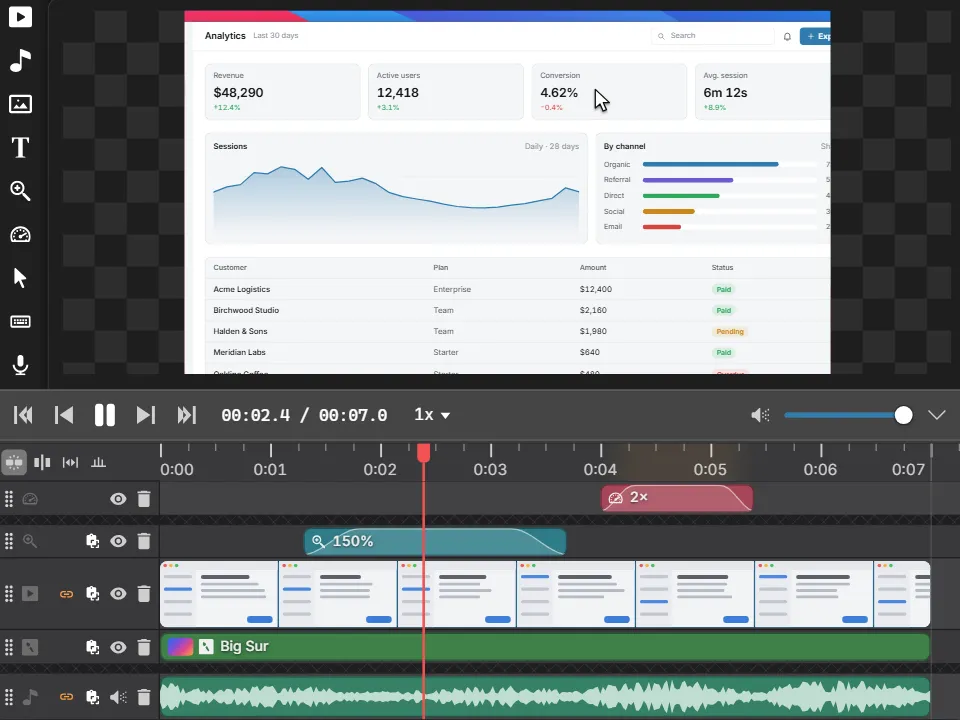
Share Region
Share a region into a meeting.
DemoMirror mirrors part of your screen to a second monitor. Clowd shares any rectangle into Teams, Zoom or Meet, with one-click blur or black-out.
More about Share Region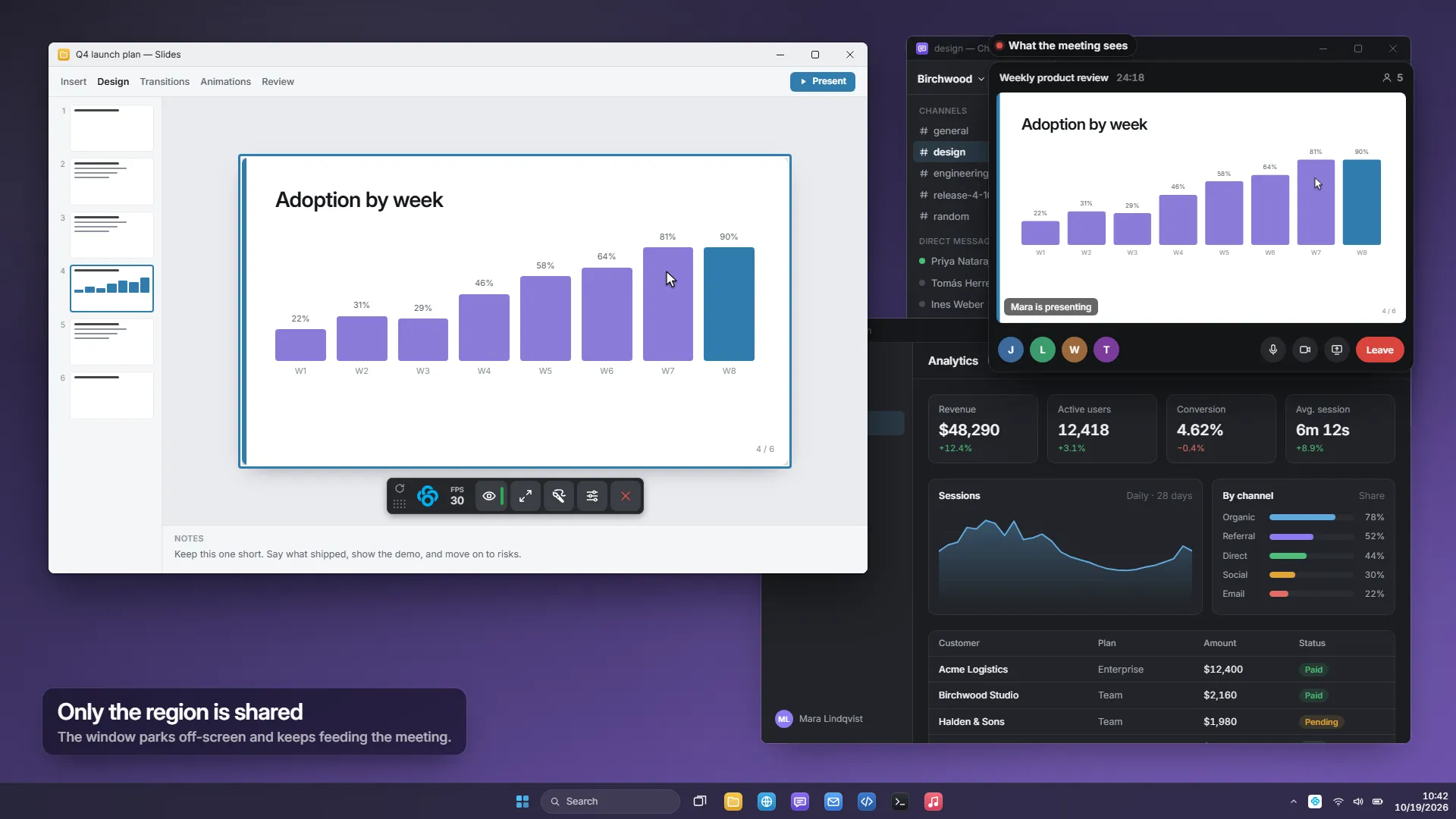
Other comparisons.
Clowd vs PowerToys
Microsoft's free utility suite, with Text Extractor, Color Picker, Screen Ruler and ZoomIt inside.
Clowd vs Epic Pen
A lightweight Windows overlay for drawing and highlighting over any app, popular in classrooms.
Clowd vs Keystro
A small overlay that shows your keystrokes live, highlights the cursor and plays keyboard sounds.