Clowd vs Screen Studio.
Screen Studio turns Mac recordings into polished videos. Clowd is a free recorder and editor for Windows and macOS.
- Price
- FreeFree. No trial, no tiers, no watermark.
- Status
- Very active4.10.0 released Oct 19, 2026. In development since 2015.
- Best for
- Multi-clip editingWindows and macOSCapture, OCR and presenting too
- Price
- $9/mo, billed yearlySubscription only: $29 per month, or $9 per month billed yearly ($108). One-time licenses are no longer sold to new customers.
- Status
- ActiveActively developed, though the public changelog is not kept current.
- Best for
- Automatic polishCaptions and transcript editsProduct launch videos
Feature by feature.
Every Screen Studio verdict comes from its own documentation.
| Feature | Clowd | Screen Studio |
|---|---|---|
| Capture | ||
| Region capture | YesPress PrtScn and drag. Edges can be placed to the pixel while zoomed. | YesCustom area (recording). |
| Scrolling capture | YesRewinds to the top first, and sticky headers appear once. Scrolls whole windows, not panes inside them. Needs Accessibility permission on macOS. | No |
| Text recognition (OCR) | YesOn-device. The text lifts off the capture so you can check it, then copy, search or share it. OCR and the AI effects need Windows or a Mac with Apple Silicon. Latin, Greek, Chinese and Japanese kana. Cyrillic and Korean aren’t supported yet. | No |
| Annotate | ||
| Image editor | YesEvery capture opens in the image editor. Objects stay editable and sessions autosave. | NoNo screenshot/image editor. |
| Record | ||
| Screen recording | YesRegion, window or screen, with a live frame-rate meter. | YesPause/resume, crash recovery, speaker notes. |
| GIF | YesAny recording converts to a GIF in one click from Recents. | YesGIF export up to 1080p. |
| System audio | YesRecorded as its own track. | Yes |
| Microphone | YesRecorded as its own track, with a live level meter. | Yes |
| Webcam | YesRecorded as a separate track you place in the editor. | YesFullscreen camera, split screen, overlay, cutout layouts. |
| Click effects | YesRipple, Pulse, Ring and Pressure effects, chosen after recording. | YesCircle/ripple click effects. |
| Keystroke overlay | Yes3D keycaps with a Shortcuts-only filter. | YesShow shortcuts. |
| Edit | ||
| Trim and cut | YesTrim, split, ripple delete and Ctrl+K to split every track. | YesTrim ends, cut middle, transcript-based cuts. |
| Multi-track timeline | YesVideo, audio, text, image, zoom, speed, cursor and keyboard rows on one timeline. | PartialEditor timeline with zoom/mask/speed and music on one recording; general multi-clip multi-track editing not advertised. |
| Zoom effects | Yes1× to 5× with eased ramps. Zoom rows stack. Zooms are placed by hand with a fixed focus. There is no auto-zoom or cursor-follow. | YesAutomatic click-based zooms plus manual zooms, classic and loupe styles. |
| Speed changes | Yes0.25× to 10× per segment, with pitch-corrected audio. | YesSpeed up sections, auto-detect long typing. |
| AI background removal | YesBackground blur or removal behind a person. OCR and the AI effects need Windows or a Mac with Apple Silicon. The part that runs text recognition and the AI effects is GPL-3.0. | YesOn-device camera background removal (camera cutout). |
| AI noise removal | YesSpeech Enhancer with a live strength dial. OCR and the AI effects need Windows or a Mac with Apple Silicon. The part that runs text recognition and the AI effects is GPL-3.0. | YesNoise reduction plus Podcast mode (beta). |
| Voice-over recording | YesCountdown, record against playback, takes land on their own Voice row. | PartialAI voiceover generated from typed text; recording a separate mic voice-over is not described. |
| Cursor smoothing | NoNo cursor path smoothing. | YesSmoothing, motion blur, resize/restyle cursor after recording, hide idle cursor. |
| Backgrounds | Yes10 background styles, including animated ones. | YesWallpapers, gradients, images, Unsplash; shadows, insets, presets. |
| Present | ||
| Draw on screen | Yes9 tools, click-through on Esc, an eraser and one undo history across monitors. | No |
| Share a region | YesAny rectangle, in any meeting app that can share a window. Blur or black it out live. Viewer frame rate is limited by the meeting app. | No |
| Share | ||
| Instant link | YesThe link is copied automatically. With accelerated uploads, the moment the upload starts. | NoLinks are created from the edited project after recording. |
| Your own storage | YesAmazon S3 and S3-compatible, Azure Blob, Cloudflare R2, Backblaze B2 and more. | No |
| Platform & price | ||
| Windows | YesWindows 10 and later, x64 and ARM64. | NoVendor says no near-future plans. |
| macOS | YesmacOS 13 and later, Apple Silicon and Intel. OCR and the AI effects need Windows or a Mac with Apple Silicon. Default hotkeys use PrtScn. Rebind them in Settings → Hotkeys on a Mac keyboard. | Yes |
| Linux | NoNot available yet. | No |
| Free | YesFree. No trial, no tiers, no watermark. | NoSubscription required. |
| Open source | YesMIT licensed. The part that runs text recognition and the AI effects is GPL-3.0. | No |
| Local-first | YesCaptures, OCR, AI effects and rendering run on your computer. Uploading is opt-in. | YesRecordings stored and processed locally; sharing opt-in. |
Sources4Checked Oct 19, 2026
- screen.studio
- screen.studio/guide/activating-screen-studio
- alternativeto.net/news/2025/10/screen-studio-has-removed-their-non-subscription-licensing-options-for-new-customers
- trainn.co/blog/screen-studio-pricing
Product names are trademarks of their owners and are used only to identify them. Spotted something out of date? Open an issue.
Where Screen Studio wins.
If these matter most to you, Screen Studio may be the better pick.
Automatic zoom on clicks, cursor smoothing and motion blur.
Captions, transcript editing and filler-word removal.
AI voiceover from typed text.
iPhone and iPad recording.
Clowd zooms are placed by hand and the cursor is not smoothed.
Where Clowd goes further.
Video Editor
A general multi-track editor.
Screen Studio polishes a single recording. Clowd puts several recordings and imports on one timeline, with audio, text and image tracks.
More about the video editor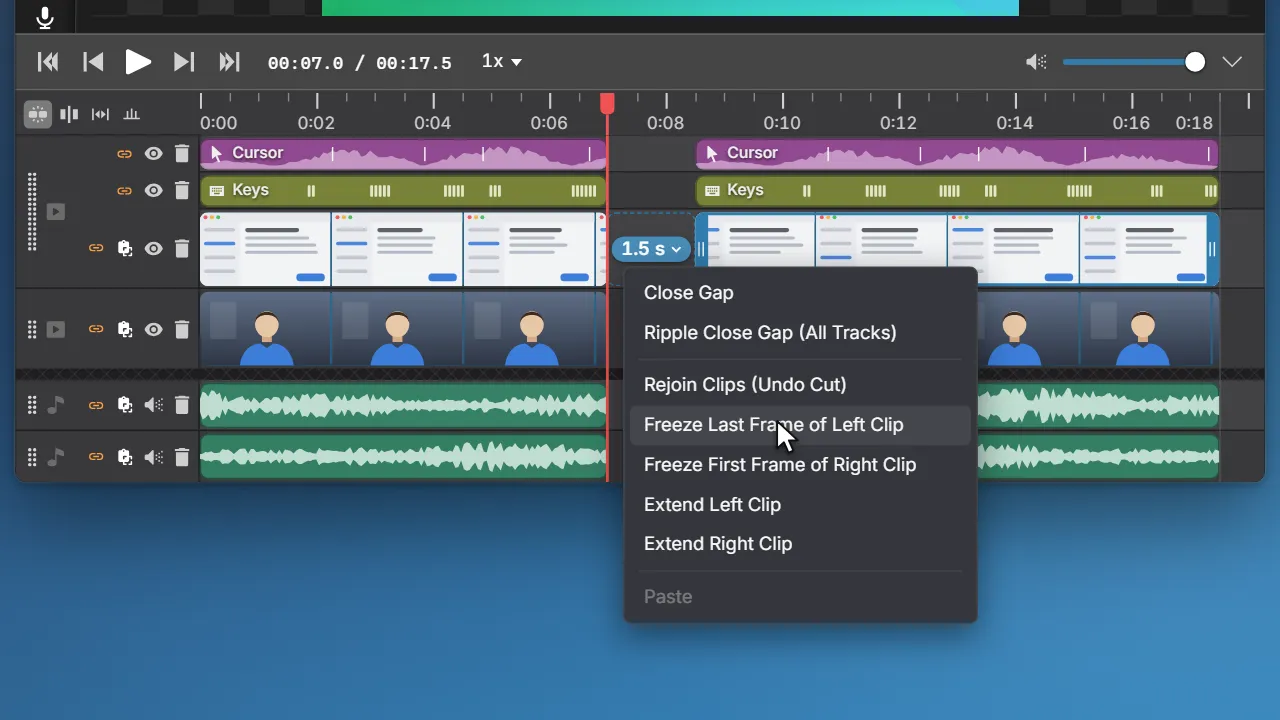
Video Editor
Voice-over you record against playback.
Screen Studio generates voiceover from text. Clowd records your own voice while the project plays, onto its own track.
More about the video editor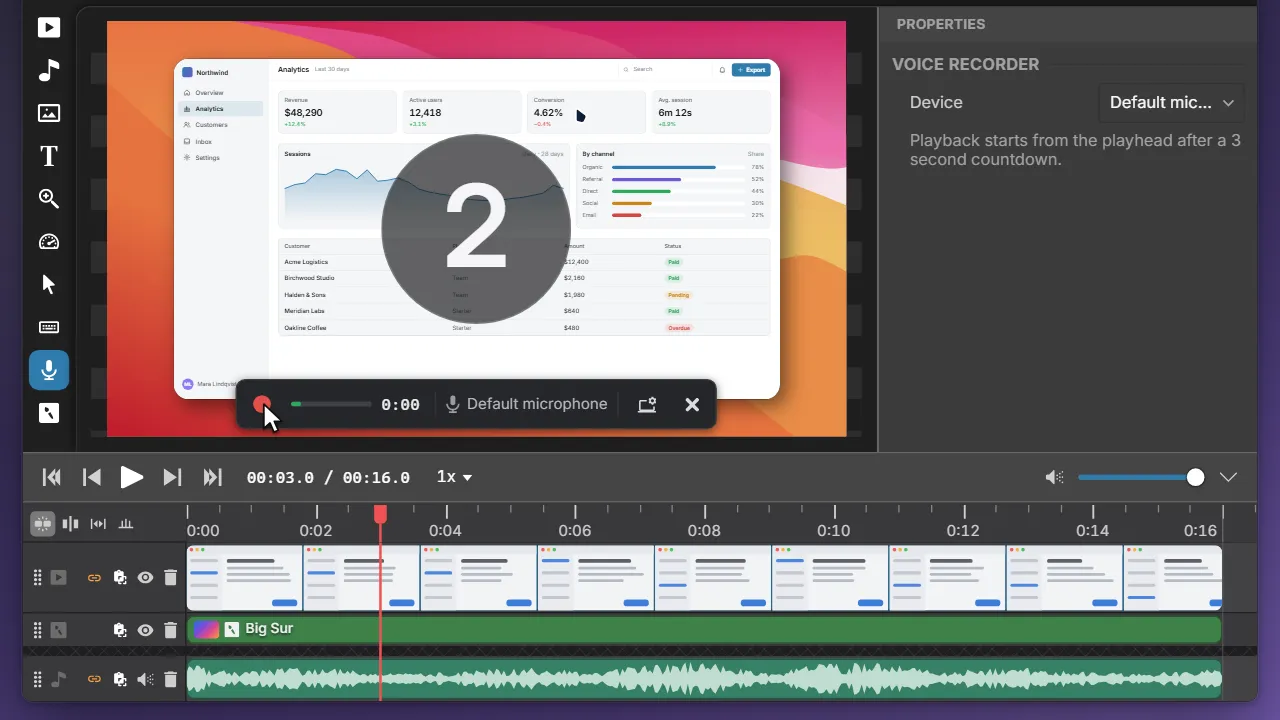
Video Editor
Record the screen, export one window.
Clowd can turn a full-screen recording into a clean window-only video. Its crop follows the window through every move and resize.
More about the video editorOther comparisons.
Clowd vs Cap
The open-source Loom and Screen Studio alternative, with instant links and a local editor.
Clowd vs Loom
Atlassian's cloud video messaging: record, get a link the moment you stop, collect comments.
Clowd vs Camtasia
TechSmith's professional recorder and multi-track editor, bundled with Snagit.
Try Clowd free.
Free and open source. Windows and macOS.